


The Evolution of Dental Technology in DFW
- IndustriousTechSolutions

- 19 hours ago
- 13 min read

The Evolution of Dental Technology in DFW
The landscape of oral healthcare is undergoing a significant transformation as digital infrastructure moves toward decentralized, internet-based models. For practitioners across the Dallas-Fort Worth metroplex, securing reliable dental IT support is no longer just a luxury but a fundamental necessity for maintaining operational efficiency. As practices transition away from traditional on-premise servers, cloud innovations are providing more robust ways to manage patient records, imaging data, and daily scheduling. This shift represents a broader trend in North Texas where dental professionals are prioritizing accessibility and data integrity over the maintenance of expensive local hardware.
The Current Landscape of Digital Dentistry
Modern dental offices are increasingly reliant on high-definition imaging, real-time diagnostic tools, and sophisticated patient engagement platforms. These technologies generate vast amounts of data that must be stored securely and retrieved instantaneously. In many DFW clinics, the limitations of legacy physical servers are becoming apparent, particularly when multiple users attempt to access large 3D scans or high-resolution radiographs simultaneously. Cloud-based systems address these bottlenecks by offloading processing and storage requirements to optimized data centers, ensuring that clinical workflows remain fluid regardless of local hardware age.
Overcoming Legacy Hardware Limitations
Physical servers located in a closet or under a front desk represent a single point of failure and a significant maintenance burden. These units require climate control, uninterruptible power supplies, and regular physical inspections to prevent catastrophic data loss. By moving to a cloud-optimized environment, practices can eliminate the cycle of expensive server replacements every three to five years. This transition allows dental teams to focus on patient care rather than troubleshooting hardware malfunctions or managing complex local backups that may or may not be functioning correctly during a crisis.
The Role of Managed Services in Modernization
Implementing cloud technology requires a strategic approach to networking and security that many in-house teams are not equipped to handle. Professional dental IT support providers help bridge this gap by auditing existing infrastructure and creating a roadmap for cloud migration. This process involves optimizing local area networks to handle increased internet traffic and ensuring that all endpoints are configured for secure remote access. By leveraging external expertise, a practice can ensure that its transition to the cloud is seamless and does not interrupt the delivery of critical patient services.
Transitioning from On-Premise Servers to Cloud Environments
The move to the cloud is often driven by a need for better data mobility and lower overhead costs. While the initial setup requires careful planning, the long-term benefits of a cloud-first strategy include improved collaboration and more consistent software performance. Many practices find that once they are no longer tethered to a physical server, they can operate with greater flexibility, allowing staff to complete administrative tasks from various locations within the office or even remotely when necessary. This flexibility is particularly valuable for multi-location practices in the Dallas area that need to centralize their operations.
Defining Private versus Public Cloud Infrastructure
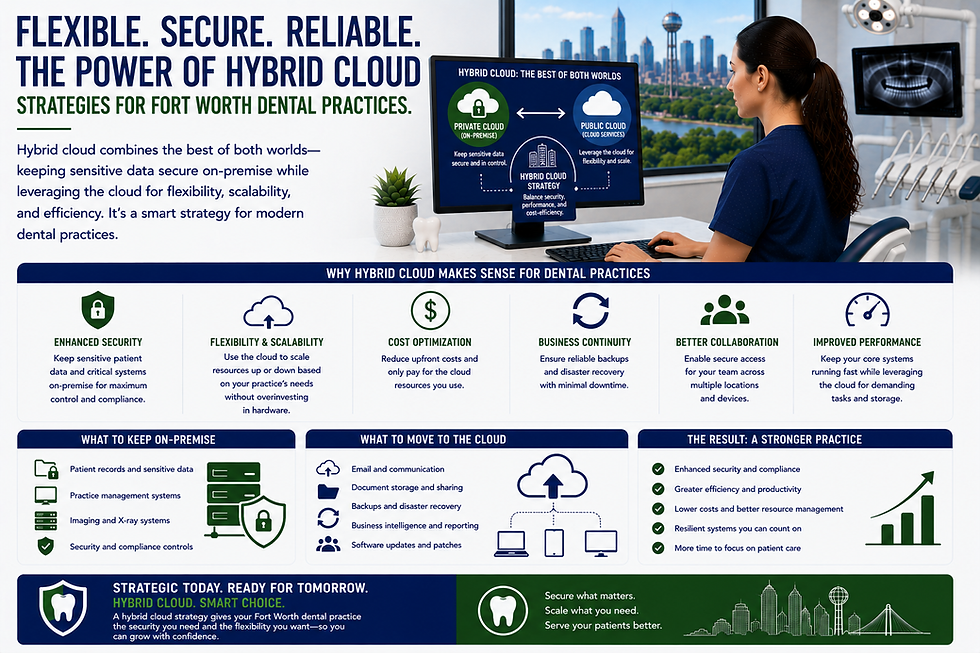
Dental practices must choose between different cloud models based on their specific security needs and budget constraints. Public cloud services offer high scalability and lower costs by sharing resources across many users, while private clouds provide dedicated environments for a single organization. Most modern dental IT support strategies involve a hybrid approach or a specialized healthcare-compliant cloud that balances the ease of use of public platforms with the rigorous security controls required for protected health information. Understanding these distinctions is vital for office managers when evaluating new software vendors.
Centralizing Data for Multi-Location Practices
For dental groups with multiple offices across North Texas, maintaining separate servers at each site creates significant data silos and administrative headaches. Cloud technology allows for a single, unified database that can be accessed from any location in real-time. This centralization ensures that patient records are always up to date, regardless of which office the patient visits. It also simplifies reporting and analytics, as practice owners can view consolidated data across all locations without having to manually export and merge files from different physical machines.
Reducing Local Hardware Dependency
One of the most immediate benefits of cloud innovation is the reduction in the total number of physical devices required on-site. When the "heavy lifting" of data processing is handled in the cloud, workstations at the front desk and in the operatories can be less powerful and more energy-efficient. Some practices are even moving toward thin clients or tablet-based interfaces for certain tasks, further reducing the physical footprint of their IT infrastructure. This reduction in local hardware not only saves space but also lowers the overall risk of hardware-related downtime and simplifies the onboarding of new employees.
Enhanced Security and Compliance in North Texas Dental Practices
Security is the most critical component of any dental IT strategy, especially given the sensitive nature of patient health records. As cyber threats become more sophisticated, North Texas dental practices must implement multi-layered defenses that go beyond simple antivirus software. Cloud environments offer built-in security features that are often far superior to what a single office could maintain on its own. However, technology alone is not enough; practitioners must also adhere to strict regulatory frameworks to avoid legal and financial repercussions.
Aligning with the HIPAA Security Rule
The federal HIPAA Security Rule establishes national standards for protecting electronic personal health information. Compliance requires the implementation of administrative, physical, and technical safeguards to ensure the confidentiality, integrity, and security of data. Cloud providers specializing in the dental industry often provide Business Associate Agreements that outline their commitment to these standards. It is essential for practices to verify that their cloud environment includes features like audit logs, automatic log-offs, and robust encryption both at rest and in transit to remain fully compliant with federal law.
Navigating Texas HB 300 Requirements
In addition to federal regulations, Texas practices must comply with Texas HB 300, which amended the Texas Medical Records Privacy Act. This state law is in many ways stricter than HIPAA, featuring broader definitions of covered entities and shorter windows for reporting data breaches. HB 300 also mandates specific training for all employees who handle protected health information. When selecting cloud solutions, Dallas-area dentists should consult with their compliance officer or legal counsel to ensure that their chosen platforms meet these heightened state-specific requirements for data privacy and employee accountability.
Implementing NIST SP 800-63B Identity Guidelines
Modern cloud security relies heavily on verifying the identity of users accessing the system. The NIST SP 800-63B guidelines provide a framework for digital identity, specifically regarding authentication and lifecycle management. Implementing multi-factor authentication is a core recommendation of these guidelines and is increasingly required by cyber insurance providers. By requiring a second form of verification, such as a code sent to a mobile device or a biometric scan, practices can significantly reduce the risk of unauthorized access resulting from compromised passwords or phishing attacks.
Streamlining Practice Management with Modern Software Solutions
The choice of practice management software is the foundation of a dental office's digital workflow. Modern platforms are increasingly moving toward cloud-native architectures that offer deeper integration with other clinical tools. This integration reduces the need for manual data entry and minimizes the risk of errors between different systems. Whether a practice is looking for better scheduling, more accurate billing, or improved patient charting, the latest software innovations are designed to make these processes more intuitive and less time-consuming for the entire team.
Cloud-Based Integration for Dentrix and Eaglesoft
Traditional industry leaders like Dentrix and Eaglesoft have developed cloud-enabled versions or hybrid models to meet the changing needs of the market. These updates allow for better synchronization with third-party applications, such as patient loyalty programs and automated appointment reminders. By utilizing these integrated features, a practice can create a more cohesive experience for the patient while reducing the administrative workload on the front office staff. Managed dental IT support services can assist in configuring these integrations to ensure data flows securely between the practice management software and other clinical modules.
Optimizing Open Dental for Remote Access
Open Dental has long been a popular choice for its flexibility and open-source nature, and it is frequently deployed in cloud-hosted environments. Moving Open Dental to a hosted server allows staff to access the full suite of clinical tools from anywhere with a secure internet connection. This is particularly useful for providers who need to review charts after hours or for administrative staff who handle billing from a home office. Proper optimization of the database and network settings is required to maintain the high performance and responsiveness that clinical teams expect during patient appointments.
Real-Time Data Syncing Across Terminals
One of the primary advantages of cloud-based practice management is the elimination of data lag between different workstations. When a change is made to a patient's chart in an operatory, that information is instantly available at the front desk for check-out and insurance processing. This real-time synchronization prevents scheduling conflicts and ensures that billing statements are accurate the moment they are generated. For busy clinics in Fort Worth, this level of efficiency is critical for maintaining high patient volume without sacrificing the quality of the administrative experience.
Improving Patient Experience Through Cloud-Enabled Communication
Technology plays a vital role in how patients perceive the quality of care they receive. Cloud-enabled communication tools allow for more transparent and frequent interactions between the clinic and the patient. From the moment an appointment is booked to the follow-up after a procedure, digital touchpoints can help build trust and improve treatment compliance. As patients in the DFW area become more tech-savvy, they expect their dental providers to offer the same level of digital convenience they experience in other sectors of the economy.
Patient Portals and Secure Messaging
Cloud-based patient portals provide a secure way for individuals to view their treatment plans, sign consent forms, and pay invoices from their own devices. These portals reduce the need for physical paperwork and can significantly speed up the check-in process on the day of an appointment. Furthermore, secure messaging features allow patients to communicate directly with the clinical team without the risks associated with standard email. This direct line of communication helps resolve questions quickly and can improve the overall satisfaction scores of the practice.
Digital Imaging and X-Ray Accessibility
Cloud storage has revolutionized the way dental images are shared with patients and specialists. Rather than burning images onto discs or printing low-quality copies, practitioners can now provide secure links to high-resolution files. This makes it easier for patients to visualize their oral health issues and understand the proposed treatment options. When referring a patient to a specialist in Dallas, the primary dentist can share the entire diagnostic history instantaneously, ensuring that the specialist has all the necessary information before the patient even arrives for their consultation.
Teledentistry and Virtual Consultations
The rise of teledentistry has been accelerated by cloud innovations, allowing for virtual consultations that save time for both the patient and the provider. While a physical exam is often necessary for a final diagnosis, initial screenings, follow-up checks, and orthodontic progress assessments can often be conducted via secure video link. This service is especially appreciated by busy professionals in North Texas who may find it difficult to leave work for minor appointments. Implementing a robust teledentistry platform requires careful attention to video encryption and data privacy to maintain compliance with the HIPAA Security Rule.
Scalability and Reliability for Growing Dallas Dental Offices
For ambitious practice owners, the ability to scale operations quickly is a major competitive advantage. Cloud infrastructure provides the foundation for this growth by allowing for the rapid addition of new workstations, operatories, or even entire satellite locations. Unlike traditional systems that might require a full server overhaul to accommodate more users, cloud environments can be adjusted with a few clicks. This scalability ensures that the IT system grows in tandem with the business, preventing technology from becoming a bottleneck during periods of expansion in the Dallas market.
Adding New Operatories Without Network Friction
When a practice decides to expand its physical footprint, the cloud simplifies the process of integrating new treatment rooms into the existing network. Because the core applications and data reside off-site, setting up a new operatory often only requires installing a computer and connecting it to the internet. There is no need to run complex server-side configurations or worry about the local hardware's ability to handle the additional load. This "plug-and-play" approach allows dental offices to become operational in new spaces much faster than would be possible with traditional on-premise infrastructure.
High-Availability Systems and Uptime Guarantees
Reliability is non-negotiable in a clinical setting where every minute of downtime translates to lost revenue and frustrated patients. Cloud providers typically offer Service Level Agreements that guarantee high levels of uptime, often exceeding 99.9%. These systems are built with multiple layers of redundancy, meaning that if one data center experiences an issue, another one takes over automatically. For a Fort Worth dental clinic, this level of reliability provides peace of mind that their patient records and scheduling tools will be available whenever they are needed, regardless of local disruptions.
Bandwidth Requirements for Cloud Computing
While the cloud reduces the need for local servers, it does place a higher demand on the practice's internet connection. Ensuring that the office has sufficient bandwidth to handle simultaneous cloud access, digital imaging uploads, and VoIP phone calls is a critical part of a successful dental IT support strategy. Many modern practices invest in redundant internet connections from different providers to ensure that they stay online even if one service fails. Properly configured routers and firewalls can also prioritize clinical traffic, ensuring that patient care systems always have the resources they need to function smoothly.
Cost-Efficiency and Long-Term Value in Modern Dental IT
Evaluating the financial impact of cloud migration requires looking beyond the initial setup costs to the total cost of ownership over several years. While cloud services typically involve a recurring monthly fee, they eliminate many of the hidden costs associated with maintaining local servers. For many practices, the transition results in more predictable IT spending and a more efficient allocation of capital. By moving IT expenses from a capital expenditure model to an operating expense model, practice owners can better manage their cash flow and invest in other areas of clinical excellence.
Predictable Monthly Operating Expenses
One of the primary financial benefits of the cloud is the shift toward a subscription-based pricing model. This allows office managers to budget with precision, as they know exactly what their software and storage costs will be each month. There are no sudden, large expenses for server repairs or emergency hardware replacements. This predictability is especially valuable for newer practices in North Texas that are carefully managing their growth and need to avoid unexpected financial shocks. Additionally, most cloud services include automated updates, ensuring the practice always has access to the latest features without additional costs.
Lowering Capital Expenditures on Server Hardware
The upfront cost of a high-end medical-grade server can be tens of thousands of dollars, not including the labor required for installation and configuration. By eliminating the need for this equipment, dental offices can redirect those funds toward clinical equipment like digital scanners, lasers, or CAD/CAM systems that directly improve patient outcomes. Over time, the savings on hardware maintenance, electricity for cooling, and physical space can be substantial. When working with a dental IT support team, practice owners can develop a financial roadmap that highlights these long-term savings and justifies the move to a cloud-based model.
Automated Software Updates and Maintenance
Maintaining software on a local server often requires manually installing patches and updates, which can lead to downtime and potential security vulnerabilities if not handled promptly. In a cloud environment, these updates are managed by the service provider and applied automatically in the background. This ensures that the practice is always running the most secure and efficient version of its software without any effort from the internal staff. It also eliminates the compatibility issues that often arise when different workstations are running different versions of the same program, leading to a more stable and reliable computing environment.
Disaster Recovery and Business Continuity in Fort Worth
Disaster recovery planning is often overlooked until it is too late. In the DFW area, risks such as severe weather, power outages, and ransomware attacks make it essential for every dental practice to have a robust business continuity plan. Cloud technology is the most effective tool for ensuring that data is protected and can be recovered quickly in the event of a localized disaster. A practice that relies solely on local backups is vulnerable to fire, theft, or equipment failure that could permanently destroy years of patient records and financial data.
Protection Against Local Hardware Failure
In a cloud-based system, the failure of a single computer in the office is a minor inconvenience rather than a major crisis. Since all data is stored securely off-site, a broken workstation can simply be replaced, and the user can log back in and resume work exactly where they left off. This resilience is a significant improvement over traditional systems where a server failure could bring the entire office to a halt for days. For a Fort Worth dental practice, this means that even if a local event occurs, the integrity of the patient database remains intact and accessible from any working device with an internet connection.
Automated Offsite Backups and Redundancy
Cloud providers maintain multiple copies of data across geographically diverse locations, providing a level of redundancy that is impossible to achieve with local backups. These backups are typically performed automatically and continuously, ensuring that even the most recent transactions are protected. This eliminates the risk of human error associated with manual backup procedures, such as forgetting to swap out a hard drive or failing to check if a backup was successful. In the event of a ransomware attack, these clean offsite backups are often the only way to restore operations without paying a ransom to cybercriminals.
Rapid Restoration After Cyber Incidents
When a security incident does occur, the speed of recovery is just as important as the protection of the data itself. Cloud environments are designed for rapid restoration, allowing a practice to get back on its feet in hours rather than days. A professional dental IT support team can coordinate this recovery process, ensuring that systems are cleaned and data is restored in the correct order to maintain database integrity. This rapid response minimizes the financial impact of the downtime and helps preserve the practice's reputation within the community. Having a proven recovery plan in place is a key component of modern clinical risk management.
Key Takeaways
Scalability: Cloud innovations allow Dallas-area dental practices to grow their infrastructure rapidly without the need for significant capital investment in new local servers.
Security Compliance: Aligning with the HIPAA Security Rule and Texas HB 300 is simplified through the use of healthcare-compliant cloud providers that offer robust encryption and audit logs.
Cost Management: Shifting from capital expenditures to predictable monthly operating expenses helps DFW dental offices manage their budgets and cash flow more effectively.
Disaster Recovery: Automated offsite backups in the cloud provide the most reliable protection against local hardware failures, theft, or severe weather events in North Texas.
Patient Engagement: Cloud-enabled portals and communication tools improve the patient experience by providing secure, real-time access to records and convenient virtual consultation options.
Operational Efficiency: Real-time data syncing across all terminals ensures that clinical and administrative teams in Fort Worth stay coordinated and reduce errors.
Legacy Hardware: Transitioning to the cloud eliminates the recurring burden of maintaining and replacing aging physical servers located on-site.
Strategic IT Support: Partnering with specialists ensures that migrations are handled securely and that local networks are optimized for the demands of cloud computing.
The transition to cloud technology represents a fundamental shift in how oral healthcare providers manage their digital assets and interact with their patients. By embracing these innovations, dental offices in the Dallas-Fort Worth metroplex can achieve a higher level of security, efficiency, and scalability than was ever possible with traditional on-premise systems. As the regulatory environment continues to evolve and cyber threats become more complex, the role of a dedicated technology partner becomes increasingly vital. Investing in a modern infrastructure today ensures that your clinic remains competitive and compliant for years to come. To learn more about optimizing your practice’s digital framework, consider the benefits of professional dental IT support for DFW dental practices that understand the unique needs of the dental industry.


Comments