


Cloud-Based Dental Software: Advantages for DFW Practices
- IndustriousTechSolutions

- 2 days ago
- 9 min read

The landscape of dental practice management has undergone a significant transformation over the last decade. For years, the standard for Dallas dental offices across the metroplex was the on-premise server—a humming box in a closet or under a desk that housed every patient record, X-ray, and billing statement. While these systems served the industry well, the limitations of physical hardware and the increasing need for professional dental IT support have prompted a widespread migration toward cloud-based solutions.
In North Texas, where many practices are expanding into multi-location groups or seeking to modernize their patient experience, cloud-based dental software has moved from an experimental option to a primary recommendation. This shift is not merely about following a trend; it is about addressing the practical, financial, and regulatory challenges that modern dentists face. By moving practice management systems (PMS) and imaging data to the cloud, DFW practices can often achieve a level of security and accessibility that was previously reserved for large-scale healthcare institutions.
Understanding the transition to the cloud requires a clear look at how these systems function and how they differ from legacy setups. Rather than owning and maintaining the infrastructure yourself, cloud computing allows you to "rent" space and software functionality from a specialized provider who handles the heavy lifting of security, updates, and hardware maintenance. For a busy dental office in Dallas or Fort Worth, this means less time spent managing IT issues and more time focused on clinical outcomes.
The Evolution of Dental Practice Management Systems
From On-Premise Servers to Web-Based Applications
The traditional model of dental IT involved "client-server" architecture. This required a powerful local server running a database, with individual workstations connected via a local area network (LAN). Cloud-based dental software, or Software as a Service (SaaS), operates through a web browser or a thin client. The actual processing and data storage happen in secure, remote data centers rather than in your North Texas office.
Why Dental IT Support is Shifting to the Cloud in North Texas
Several factors are driving DFW dental practices toward the cloud. These include the rising cost of high-end server hardware, the need for better remote access for billing and administrative staff, and the increasing sophistication of ransomware attacks targeting local servers. Many practices are finding that their legacy hardware is reaching "end-of-life," providing a natural transition point to evaluate modern alternatives.
Understanding the Differences in Data Ownership
A common concern for dentists is whether they still "own" their data in the cloud. Most reputable cloud providers specify in their Service Level Agreements (SLAs) that the practice retains full ownership of patient records. The cloud provider acts as a "data processor," while the practice remains the "data controller." This distinction is vital for maintaining professional standards and meeting ethical obligations.
Financial Advantages: Moving from CapEx to OpEx
Eliminating High Upfront Hardware Costs
One of the most immediate benefits of cloud-based software is the reduction in Capital Expenditure (CapEx). A traditional server-based setup often requires an initial investment of thousands of dollars in server hardware, backup drives, and networking equipment. Cloud solutions typically require little to no upfront hardware investment, as the software runs on standard workstations or even tablets.
Predictable Subscription-Based Budgeting
Cloud software operates on an Operating Expenditure (OpEx) model. Practices pay a monthly or annual subscription fee, which usually includes the software license, data storage, and technical support. This predictability helps Dallas dental offices manage their cash flow more effectively, as there are no "surprise" costs associated with a server motherboard failing or needing an emergency memory upgrade.
Reducing On-Site Dental IT Support Expenses
When the server is in the cloud, the need for on-site dental IT support to manage physical hardware is significantly reduced. While you still need a local network and an internet connection, you no longer need to pay for regular server patching, physical cleaning, or hardware lifecycle management. This allows the practice to reallocate those funds toward clinical equipment or patient marketing.
Enhanced Accessibility for Multi-Location DFW Practices
Seamless Connectivity Across Dallas and Fort Worth Offices
For dentists with multiple locations across the metroplex—perhaps one office in Plano and another in Fort Worth—cloud software provides a "single pane of glass" view. There is no need for complex Virtual Private Networks (VPNs) or remote desktop setups to see schedules or records at a different location. All data is centralized and accessible from any authorized device with an internet connection.
Secure Remote Access for Administrative Staff
The ability to work from home has become a significant benefit for administrative and billing staff. With cloud-based systems, a practice manager can check the schedule from a home office in Arlington, or a biller can process insurance claims without being physically present in the clinic. This flexibility can be a major advantage in the competitive North Texas job market.
Real-Time Data Synchronization
In an on-premise environment, syncing data between locations often involves "batching" or delayed transfers, which can lead to double-booked appointments or outdated patient information. Cloud systems update in real-time. If a patient changes their address via an online portal, that change is immediately visible to the front desk in Dallas and the clinical team in Fort Worth.
Security and Data Redundancy in the Cloud
Enterprise-Level Data Centers vs. Local Server Closets
Most cloud dental software providers host their data in Tier 3 or Tier 4 data centers, such as those operated by Amazon Web Services (AWS) or Microsoft Azure. These facilities have physical security measures, redundant power supplies, and climate control systems that are impossible to replicate in a typical dental office. This move shifts the burden of physical security from the dentist to a multi-billion dollar infrastructure provider.
Automated Backups and Disaster Recovery
Data loss is one of the greatest threats to a dental practice. Traditional tape or USB backups are notoriously unreliable and often dependent on human intervention. Cloud systems typically feature "continuous" backup, meaning data is saved and replicated across multiple geographic regions automatically. If a disaster strikes one data center, another can take over almost instantly.
Mitigating the Impact of North Texas Weather Events
The DFW area is no stranger to severe weather, from spring tornadoes to winter ice storms. If a local server is damaged by a power surge or a roof leak during a North Texas storm, the practice could face days or weeks of downtime. With a cloud-based PMS, the data is safe in a remote location. If the office is inaccessible, the team can still access the schedule and patient contact information from a mobile device to manage cancellations or emergency referrals.
Navigating HIPAA and Texas HB 300 Compliance
Shared Responsibility Model for Data Protection
In the cloud, compliance is a shared responsibility. The cloud provider is responsible for the "security of the cloud" (the physical servers and infrastructure), while the practice is responsible for "security in the cloud" (managing user access, strong passwords, and employee training). It is essential to ensure that your provider will sign a Business Associate Agreement (BAA) to satisfy HIPAA requirements.
Texas Medical Records Privacy Act (HB 300) Requirements
Texas dental practices must also comply with the Texas Medical Records Privacy Act, commonly known as HB 300. This law is often more stringent than federal HIPAA regulations, particularly regarding the timing of patient record releases and the mandatory privacy training for employees. Most modern cloud systems include features like automated audit logs that make demonstrating compliance with HB 300 significantly easier during an audit.
Audit Trails and Access Logs
A critical component of both HIPAA and Texas regulatory compliance is knowing who accessed which patient record and when. Cloud-based systems are built with these "audit trails" as a core feature. They track every login, every record view, and every modification, providing a permanent, unalterable log that protects the practice in the event of a security inquiry or a patient dispute.
Streamlining Practice Operations and Efficiency
Automatic Software Updates and Patch Management
One of the most tedious aspects of on-premise software is the update process. These often require the office to be closed, and if an update fails, the practice may be unable to open the next morning. Cloud providers push updates "silently" in the background. When your staff logs in on Monday morning, they are automatically using the latest, most secure version of the software without any intervention from your dental IT support team.
Simplified Integration with Digital Imaging
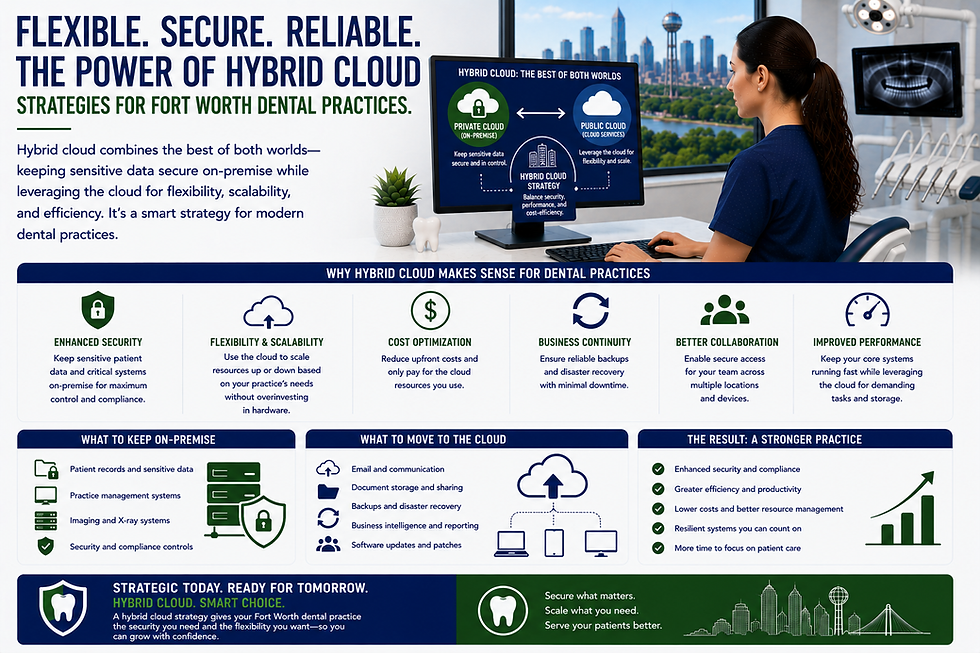
Early cloud systems struggled with the large file sizes of 3D CBCT scans and high-resolution digital X-rays. However, modern "cloud-hybrid" or pure cloud imaging solutions have largely solved this. By using advanced compression and intelligent caching, DFW practices can now view diagnostic-quality images directly in a web browser, often faster than they could on an old local network.
Centralizing Patient Records and Communication
Cloud systems often integrate communication tools directly into the PMS. Instead of having a separate service for text reminders, another for online forms, and another for the clinical record, a cloud-based approach brings these under one umbrella. This centralization reduces the "data silos" that often lead to errors or missed opportunities in patient care.
Improving the Patient Experience in North Texas
Online Scheduling and Digital Intake Forms
Patients in the Dallas-Fort Worth area expect the same level of digital convenience from their dentist that they get from their bank or favorite retailer. Cloud systems enable real-time online scheduling that reflects the actual availability in your PMS. Digital intake forms can be completed on a patient's smartphone before they arrive at one of your Fort Worth clinics, eliminating the clipboard and reducing time in the waiting room.
Secure Patient Portals for Billing and Records
A secure portal allows patients to view their treatment plans, see balance statements, and make payments online. This not only improves the patient experience but also accelerates the practice's revenue cycle. When a patient can pay their bill from their phone while sitting in North Texas traffic, the office gets paid faster, and administrative overhead is reduced.
Mobile-Friendly Communication Tools
Modern patients often prefer text messaging over phone calls. Cloud-based dental software typically includes two-way texting that is logged directly into the patient's chart. This ensures that all communication—whether it’s a reminder about an appointment in Southlake or a post-op check-in for a patient in Dallas—is documented and accessible to the entire clinical team.
Technical Considerations for a Cloud Transition
Internet Bandwidth Requirements for DFW Offices
The "Achilles' heel" of cloud software is the internet connection. Since the software lives online, a slow or unreliable connection will result in a poor user experience. Most North Texas dental offices should look for business-grade fiber or high-speed cable internet. Industry estimates suggest a minimum of 25-50 Mbps download speed for a small practice, though larger offices with heavy imaging needs may require significantly more.
Redundant Internet Connections (SD-WAN)
To mitigate the risk of an internet outage, many Dallas dental practices implement a "redundant" connection. This involves having a primary provider (like a fiber line) and a secondary provider (like a cellular 5G backup). A technology called SD-WAN can automatically switch the office to the backup connection if the primary one fails, ensuring the practice stays online even if a construction crew down the street accidentally cuts a cable.
Data Migration and Legacy System Sunset
The most complex part of moving to the cloud is data migration. Moving years of patient data, appointments, and images from an old server to a new cloud system requires careful planning. It is essential to work with a provider or a dental IT support specialist who has experience with your specific legacy system to ensure that nothing is lost in transition and that the "mapping" of data is accurate.
Selecting a Cloud Provider: Key Evaluation Criteria
Data Encryption Standards and NIST SP 800-63B
When evaluating providers, look for those who employ "encryption at rest" and "encryption in transit." Furthermore, ensure the system supports modern authentication standards. Following NIST SP 800-63B guidelines, a secure system should offer multi-factor authentication (MFA). MFA is one of the most effective ways to prevent unauthorized access, even if a staff member’s password is compromised.
Uptime SLAs and Performance Monitoring
Review the provider’s Service Level Agreement (SLA) regarding "uptime." Most reputable cloud companies aim for "three nines" (99.9%) or "four nines" (99.99%) availability. This represents only a few hours of potential downtime per year. You should also ask how they communicate service interruptions and what their protocol is for scheduled maintenance.
Technical Support Availability in the Central Time Zone
While cloud software is generally more reliable, you still need access to support when questions arise. For DFW practices, it is beneficial to work with a provider that offers support during Central Standard Time (CST) business hours. Having to wait for an East Coast office to open or a West Coast office to wake up can be frustrating when you have a patient in the chair and a technical question that needs an immediate answer.
Transitioning Your DFW Practice to Cloud-Based Dental IT Support
The move to cloud-based dental software is a strategic decision that affects every department of a dental office. From the way the front desk schedules appointments to the way the dentist views 3D scans, the cloud changes the workflow in ways that generally favor efficiency and security. While the transition requires an initial investment of time and training, the long-term benefits of reduced hardware costs, improved compliance, and better accessibility often outweigh the temporary challenges of change. For practices in the Dallas-Fort Worth area, the local environment—characterized by rapid growth and occasional extreme weather—makes the case for cloud computing even stronger. By removing the "single point of failure" that a local server represents, dentists can build a more resilient business that is prepared for the future of digital dentistry.
Key Takeaways
Financial Shift: Cloud software moves dental IT costs from large, unpredictable capital outlays to predictable monthly operating expenses.
Weather Resilience: DFW practices benefit from cloud-based disaster recovery, protecting data from local storms, power outages, and hardware failures.
Regulatory Compliance: Most cloud systems simplify HIPAA and Texas HB 300 compliance through automated audit logs and built-in security features.
Staff Flexibility: Secure remote access allows administrative and billing teams to work from anywhere, helping with staff retention and multi-location management.
Infrastructure: A transition to the cloud requires a robust, ideally redundant, internet connection to ensure consistent performance.
Patient Experience: Integrated tools like online scheduling and digital portals meet the modern expectations of North Texas patients.
If you are currently evaluating your practice's technology stack or are dealing with the frustrations of an aging server, it may be time to consult with experts in the field. For comprehensive guidance on modernizing your office, consider exploring professional dental IT support in the DFW area to ensure your transition is secure and efficient.


Comments