


Transitioning to the Cloud for DFW Dental Practices
- IndustriousTechSolutions

- 2 days ago
- 11 min read

Transitioning to the Cloud for DFW Dental Practices
The Operational Advantages of Cloud Migration
Modern dental clinics across the DFW region are increasingly moving their operations to cloud-based systems to enhance flexibility and reduce the burden of on-site hardware maintenance. By leveraging cloud infrastructure, a practice can access patient data from multiple locations, enabling specialists and administrative staff to work more efficiently without the constraints of a localized server. However, this transition requires a robust framework to ensure that data remains secure and accessible only to authorized personnel. Implementing a strategy for dental IT support early in the migration process helps identify potential vulnerabilities before they can be exploited, providing a stable foundation for digital growth.
Common Security Concerns for Cloud Storage
While the cloud offers many benefits, it also introduces new risks that must be managed to prevent unauthorized access to sensitive patient information. Data breaches in the healthcare sector can lead to significant financial penalties and a loss of trust from the community. Many practices worry about the physical location of their data and the security protocols used by third-party providers to protect against external threats. Addressing these concerns involves a thorough evaluation of the service provider's infrastructure and the implementation of strong internal policies regarding data handling and sharing within the office environment.
The Importance of Specialized Technical Guidance
Navigating the complexities of cloud security is a daunting task for many office managers and clinicians who must prioritize patient care. Specialized technical guidance ensures that the cloud environment is configured according to industry best practices, minimizing the risk of misconfiguration which is a leading cause of data exposures. Technical experts can help select the right platforms that align with the specific workflow of a dental office, from imaging storage to communication tools. By establishing a partnership with knowledgeable professionals, a practice can ensure its digital assets are protected by the latest defensive technologies and monitoring systems.
Navigating Regulatory Requirements in Dallas and North Texas
Adhering to the HIPAA Security Rule
The HIPAA Security Rule establishes national standards to protect individuals' electronic personal health information that is created, received, used, or maintained by a covered entity. For dental practices in Dallas, compliance involves ensuring the confidentiality, integrity, and availability of all ePHI. This requires performing regular risk assessments to identify potential gaps in cloud security and implementing technical safeguards like audit controls and integrity measures. Cloud providers must be willing to enter into a Business Associate Agreement (BAA), which legally binds them to follow HIPAA regulations and protect the data they host on behalf of the practice.
Understanding the Impact of Texas HB 300
In addition to federal regulations, dental practices in North Texas must also comply with the Texas Medical Records Privacy Act, which was significantly strengthened by Texas HB 300. This state law is often stricter than HIPAA, featuring shorter notification windows for data breaches and requiring mandatory privacy training for all employees who handle sensitive information. HB 300 also expands the definition of a covered entity to include any person or organization that comes into possession of PHI. Understanding these state-specific nuances is critical for maintaining compliance and avoiding the heavy fines associated with violations at both the state and federal levels.
Comparing Federal and State Compliance Standards
When a practice operates within the state of Texas, it must adhere to the standard that provides the greatest protection for patient privacy. This often means that while HIPAA provides the baseline for security, Texas HB 300 dictates the specific operational responses required in the event of a security incident. Reconciling these two sets of regulations requires a comprehensive compliance strategy that includes documented policies, regular staff training, and rigorous technical oversight. Practices should consult with compliance experts or legal counsel to ensure their cloud storage solutions and internal procedures meet every requirement of both federal and state laws.
Implementing Robust Encryption Protocols
Protecting Data at Rest in the Cloud
Encryption is a fundamental component of any cloud security strategy, acting as the last line of defense if unauthorized access occurs. Data at rest refers to information that is stored on physical disks or in cloud databases, and it must be encrypted using strong algorithms to ensure it is unreadable to anyone without the proper decryption keys. Using Advanced Encryption Standard (AES) with 256-bit keys is widely considered the industry standard for securing sensitive healthcare data. By ensuring that cloud providers employ these high-level encryption standards, dental practices can significantly reduce the risk of meaningful data exposure during a physical or virtual storage compromise.
Securing Data in Transit Across Networks
Information is most vulnerable when it is being transmitted between the dental office and the cloud server. Data in transit must be protected using secure communication protocols such as Transport Layer Security (TLS) to prevent interception by malicious actors. This is particularly important for practices that utilize remote access or tele-dentistry services, where data may travel over various public and private networks. Implementing end-to-end encryption ensures that patient records, digital x-rays, and financial information remain private from the moment they leave the practice’s local network until they reach their intended destination in the cloud.
Encryption Management and Key Ownership
Effective encryption also involves careful management of the cryptographic keys used to lock and unlock data. Practices should understand whether their cloud provider manages these keys or if the practice has the option to maintain control over its own encryption keys. Key ownership can provide an additional layer of security, as it prevents the service provider from accessing the data without the practice’s explicit permission. However, it also places the responsibility for key backup and recovery squarely on the practice. Dental IT support professionals can assist in determining the best key management strategy based on the practice’s technical capabilities and security requirements.
Access Control and Identity Management
Adopting NIST SP 800-63B Guidelines
The National Institute of Standards and Technology (NIST) provides detailed guidelines for digital identity, specifically in special publication NIST SP 800-63B. These guidelines outline best practices for authentication and lifecycle management, which are essential for securing access to cloud-based dental systems. By following these standards, practices can implement stronger password policies and more reliable identity verification processes. Adopting these federal recommendations helps ensure that only authorized users can gain entry to the practice's sensitive data, reducing the likelihood of credential-based attacks such as phishing or brute-force attempts.
The Necessity of Multi-Factor Authentication
Multi-factor authentication (MFA) is one of the most effective tools for preventing unauthorized access to cloud environments. By requiring two or more independent forms of verification—such as a password and a code sent to a mobile device—MFA ensures that a compromised password alone is not enough to grant access to patient records. Many cloud-based practice management platforms now offer integrated MFA features that should be enabled for every user in the office. This extra layer of security is especially critical for administrators and practitioners who have broad access to the entire database of patient information and practice finances.
Utilizing Role-Based Access Controls
Role-Based Access Control (RBAC) allows practice owners to restrict system access based on the specific job functions of each employee. For instance, a receptionist may only need access to the scheduling and billing modules, while a clinical assistant requires access to patient charts and imaging data. By limiting access to the minimum necessary information required for each role, the practice reduces the potential impact of an internal or external security breach. Regularly reviewing and updating these access levels is essential as staff roles change or as employees leave the practice, ensuring that permissions remain tightly controlled and aligned with current operational needs.
Assessing Cloud Service Providers for Fort Worth Clinics
Evaluating Business Associate Agreements
Before any Fort Worth clinic migrates data to a cloud provider, they must secure a signed Business Associate Agreement (BAA). This document is a critical legal requirement under HIPAA that outlines the provider's responsibilities for protecting PHI. The BAA should clearly state how the provider will manage security incidents, their notification procedures in the event of a breach, and how they will handle data if the business relationship ends. A provider that refuses to sign a BAA is not suitable for hosting dental health information, and practices should never proceed with a vendor that does not fully understand and accept these regulatory obligations.
Analyzing Data Sovereignty and Redundancy
Data sovereignty refers to the legal jurisdiction where the data is physically stored, which can have implications for compliance and access. Practices should verify that their cloud provider stores data in secure facilities located within the United States to ensure consistent application of federal laws. Additionally, robust data redundancy is necessary to prevent data loss in the event of a hardware failure or natural disaster at the provider’s primary data center. This involves maintaining multiple copies of the data across different geographic regions, ensuring that the practice can continue to operate and access its records even if one facility is temporarily offline.
Reviewing Security Certifications and Audits
Reputable cloud providers undergo regular third-party audits to verify their security posture and compliance with international standards. Certifications such as SOC 2 Type II or ISO/IEC 27001 demonstrate a provider’s commitment to maintaining rigorous security controls over an extended period. Dental practices should request and review these audit reports to gain confidence in the provider’s ability to protect sensitive information. These documents provide an objective assessment of the provider’s internal processes, from physical security at the data center to the software development lifecycle, offering peace of mind to practitioners in the Fort Worth area.
Securing Practice Management Software in the Cloud
Cloud Security Features in Dentrix
Dentrix is a widely used practice management solution that offers various cloud-enabled features designed to streamline dental office workflows. When utilizing Dentrix in a cloud or hybrid capacity, it is essential to ensure that the synchronization between local workstations and the cloud server is encrypted and secure. Users in Dallas should take advantage of the platform’s built-in security settings, such as automatic timeouts and password complexity requirements, to protect local access points. Regular software updates are also necessary to patch any discovered vulnerabilities and to ensure the practice is using the latest security enhancements provided by the developer.
Eaglesoft and Cloud-Ready Environments
Eaglesoft provides comprehensive tools for managing clinical and administrative tasks, and many practices are now looking for ways to integrate these tools with cloud-based storage and backup solutions. Maintaining a secure environment for Eaglesoft involves configuring firewalls and local network settings to prevent unauthorized outbound data transfers. It is also important to ensure that any third-party integrations, such as patient engagement platforms or electronic claim services, are also cloud-secure and HIPAA compliant. By maintaining a holistic view of the Eaglesoft ecosystem, dental IT support teams can prevent security gaps that often occur at the intersection of different software applications.
Open Dental and Hybrid Cloud Strategies
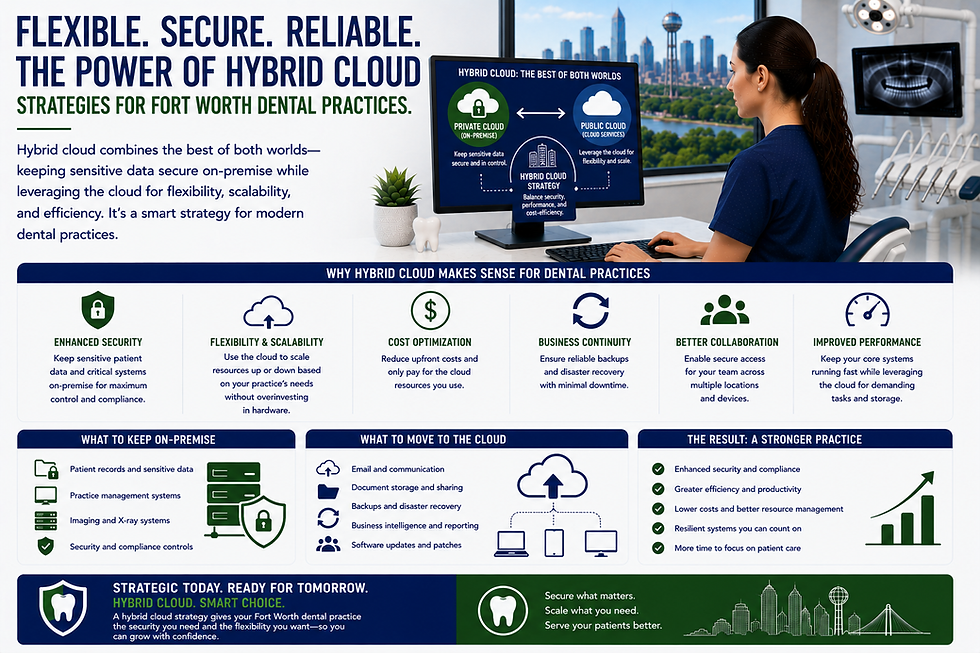
Open Dental is known for its flexibility and open-source foundation, making it a popular choice for practices that want to customize their management systems. For those employing a hybrid cloud strategy—where the database remains on-site but backups and certain modules are hosted in the cloud—security coordination is paramount. This requires carefully managing the connection between the local server and the cloud components to ensure that data does not leak during the synchronization process. Practices must also be diligent about securing the underlying operating systems and web servers that host the Open Dental database, as these can become targets for specialized malware or ransomware attacks.
Network Security for Cloud Connectivity in DFW
Implementing Advanced Firewall Protection
The local network is the gateway to the cloud, and it must be protected by an advanced firewall that can inspect traffic for malicious activity. For DFW dental offices, a standard consumer-grade router is often insufficient to meet the security demands of a modern practice. Next-generation firewalls provide deep packet inspection, intrusion prevention systems, and the ability to segment the network into different security zones. By isolating the guest Wi-Fi from the clinical network, for example, a practice can prevent patients or visitors from accidentally or intentionally accessing the servers where PHI is processed and stored before being sent to the cloud.
Using Virtual Private Networks for Remote Access
As more practitioners and staff members work from home or access the practice management system from different locations, the use of Virtual Private Networks (VPNs) has become essential. A VPN creates a secure, encrypted tunnel through the internet, allowing remote users to connect to the practice's network as if they were physically in the office. This ensures that sensitive data remains protected even when accessed over unsecured home or public Wi-Fi networks. It is important to use enterprise-grade VPN solutions that support strong authentication and are regularly updated to protect against evolving threats that target remote access vulnerabilities.
Secure Wireless Networking Best Practices
Wireless networks in a dental office must be configured with the highest level of security to prevent unauthorized devices from joining the network. Utilizing WPA3 encryption, the latest standard for wireless security, provides improved protection against password-guessing attacks and ensures better data privacy for individual users. Additionally, the network's Service Set Identifier (SSID) should not be broadcasted if possible, and the administrative interface of the wireless access point must be secured with a unique, complex password. Regular monitoring of the network for unknown devices can help identify potential intruders before they can cause harm to the practice's cloud-connected systems.
Preparing for Potential Data Breaches
Developing a Comprehensive Incident Response Plan
Despite the best security measures, every practice must be prepared for the possibility of a data breach. An incident response plan outlines the specific steps the office should take immediately following the discovery of a security incident, from containing the breach to notifying the proper authorities. This plan should identify the internal response team and any external partners, such as legal counsel or technical forensic experts, who will assist in the recovery. For Fort Worth clinics, having a pre-defined plan ensures that the practice can act quickly and decisively, which is critical for meeting the strict notification timelines required by Texas state law.
The Role of Backup and Disaster Recovery
A robust Backup and Disaster Recovery (BDR) strategy is the primary defense against data loss caused by ransomware or hardware failure. Cloud-based backups should be performed automatically and frequently, with multiple versions of the data stored to protect against file corruption. It is essential to test these backups regularly to ensure that data can be restored quickly and accurately in an emergency. A practice that cannot recover its data within a reasonable timeframe may face significant operational disruptions and financial losses. Modern dental IT support services often include managed BDR solutions that provide continuous monitoring and rapid recovery capabilities for both local and cloud environments.
Ongoing Employee Training and Awareness
The human element is often the weakest link in any security strategy, making ongoing employee training a vital part of breach prevention. Staff members should be educated on the latest phishing techniques, social engineering tactics, and the importance of maintaining strong password hygiene. Regular training sessions help build a culture of security awareness within the practice, where every team member understands their role in protecting patient privacy. By keeping security at the forefront of daily operations, practices can significantly reduce the risk of accidental data exposures that result from simple mistakes or a lack of understanding of the practice's cloud security policies.
Key Takeaways for Cloud Security in North Texas
Compliance Priority: Dental practices must strictly adhere to both the federal HIPAA Security Rule and the Texas HB 300 to avoid severe penalties and protect patient trust.
Encryption Standard: Utilizing AES-256 bit encryption for data at rest and TLS for data in transit is essential for keeping patient information unreadable to unauthorized parties.
Authentication Strength: Implementing multi-factor authentication and following NIST SP 800-63B guidelines significantly reduces the risk of account takeovers and unauthorized access.
Vendor Accountability: Always secure a Business Associate Agreement with cloud providers to ensure they are legally committed to maintaining healthcare security standards.
Software Security: Platforms like Dentrix, Eaglesoft, and Open Dental require careful configuration and regular updates to maintain a secure cloud or hybrid environment.
Network Defense: Using enterprise-grade firewalls and secure VPNs is necessary to protect the local gateway to cloud-hosted dental systems.
Resilience Planning: A tested backup and disaster recovery plan combined with an incident response strategy ensures the practice can survive and recover from a security breach.
Staff Training: Regular security awareness training for all employees is the most effective way to combat phishing and other common social engineering threats in North Texas.
Sustaining a Secure Digital Environment
Achieving a secure cloud environment is not a one-time task but an ongoing process of monitoring, evaluation, and improvement. As cyber threats continue to evolve, dental practices in the DFW metroplex must remain vigilant and proactive in their approach to data protection. This involves staying informed about new regulations, updating security protocols as new technologies emerge, and regularly auditing the performance of cloud service providers. By prioritizing data security, practice owners can focus on delivering high-quality clinical care with the confidence that their patient records and business operations are well-protected. Investing in professional dental IT support for DFW dental practices ensures that your office remains compliant and secure in an increasingly digital landscape.


Comments