


Encryption Best Practices for Sensitive Data
- IndustriousTechSolutions

- May 8
- 10 min read
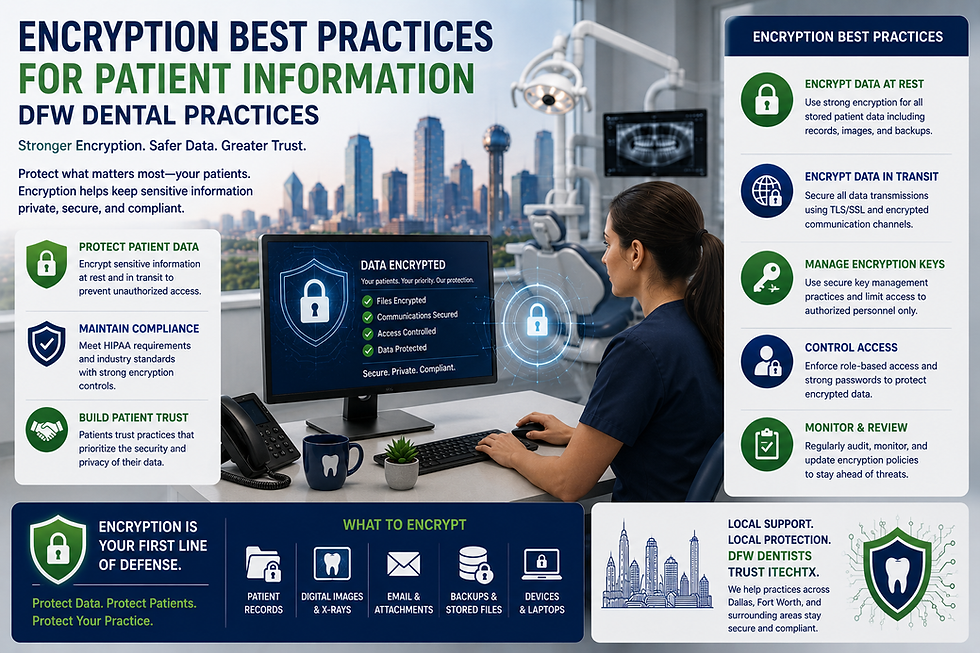
In the rapidly growing healthcare landscape of the Dallas-Fort Worth metroplex, dental practices are increasingly becoming targets for sophisticated cyber threats, making professional dental IT support an essential component of modern practice management. As a practice owner or office manager, you handle a treasure trove of Protected Health Information (PHI) every day, from digital X-rays and treatment plans to insurance details and Social Security numbers. Protecting this data is not just a clinical necessity; it is a legal requirement that carries significant weight in the state of Texas.
Encryption serves as the primary line of defense in your cybersecurity strategy. It is the process of converting sensitive information into an unreadable format that can only be unlocked with a specific digital key. For many North Texas dental offices, the technical nuances of encryption can feel overwhelming, especially when balanced against the daily demands of patient care. However, understanding and implementing encryption best practices is essential for maintaining patient trust and ensuring the longevity of your practice.
This guide provides a comprehensive overview of how DFW dental practices should approach encryption. We will explore the regulatory requirements, the different types of encryption needed for modern workflows, and practical steps you can take to secure your patient data without disrupting your team’s efficiency.
Understanding Encryption Fundamentals for Dallas Dental Offices
What is Encryption?
At its core, encryption is a mathematical safeguard. It takes "plaintext" (readable data) and scrambles it into "ciphertext" (unreadable code) using an algorithm. Without the corresponding decryption key, the ciphertext is useless to an unauthorized party. For a dental office, this means that even if a laptop is stolen from a car in Downtown Dallas or a server is hacked, the patient records remain inaccessible to the perpetrator.
Data at Rest vs. Data in Transit
To build an effective strategy, you must distinguish between two states of data. "Data at rest" refers to information stored on physical or digital media, such as hard drives, servers, or cloud storage. "Data in transit" refers to information moving across a network, such as an email sent to a specialist or data synced between a local workstation and a cloud-based practice management system. Both states require robust encryption to be considered secure.
The Role of Decryption Keys
Encryption is only as strong as the management of its keys. These keys are essentially the "passwords" that unlock the data. If a key is lost, the data may be permanently unrecoverable. Conversely, if a key is stored insecurely—such as in a plain text file on the same server as the encrypted data—the encryption itself becomes trivial to bypass. Proper key management is a cornerstone of professional dental IT support.
Symmetric vs. Asymmetric Encryption
While you don't need to be an expert in cryptography, knowing the difference helps in evaluating software. Symmetric encryption uses the same key for both locking and unlocking data, making it fast and ideal for large databases. Asymmetric encryption uses a public key to lock data and a private key to unlock it, which is often used for secure communications like email and digital signatures.
Regulatory Landscape: HIPAA and Texas HB 300
HIPAA Security Rule Standards
Under federal law, the HIPAA Security Rule categorizes encryption as an "addressable" implementation specification rather than a "required" one. However, this is often misunderstood. "Addressable" means that if you choose not to encrypt, you must document why it is not reasonable or appropriate and implement an equivalent alternative. In the modern DFW dental market, industry experts generally agree that there is no reasonable alternative to encryption that provides the same level of protection.
Texas Medical Records Privacy Act (HB 300)
Texas has some of the strictest data privacy laws in the country. HB 300 expanded the definition of a "covered entity" and increased the potential penalties for privacy violations. For Fort Worth clinics and Dallas dental offices, HB 300 means that state-level enforcement can be just as rigorous as federal oversight. Compliance with Texas law requires a proactive approach to securing electronic PHI (ePHI).
Safe Harbor Provisions
One of the most significant benefits of encryption is the "Safe Harbor" provision. Under HIPAA, if encrypted data is lost or stolen, it is generally not considered a "breach" because the data is unreadable. This means you may not be required to notify patients or the media, saving your practice from devastating reputational damage and the high costs of breach notification services.
Understanding HIPAA Penalties
The Office for Civil Rights (OCR) oversees HIPAA enforcement. Penalties for non-compliance are tiered based on the level of negligence. While we cannot provide specific figures, as the OCR periodically updates its penalty schedules, many practices have faced substantial financial burdens for failing to implement basic encryption on portable devices. Practice owners should consult the current OCR schedule to understand the potential risks of non-compliance.
Encrypting Data at Rest: Protecting Stored PHI
Full Disk Encryption (FDE) for Workstations
Every desktop and laptop in your North Texas practice should utilize Full Disk Encryption. This ensures that the entire hard drive is protected from the moment the device is turned off. For Windows users, BitLocker is a common and effective tool, while Mac users typically utilize FileVault. If a device is misplaced or stolen, FDE ensures that no one can bypass the login screen to access the files underneath.
Server-Level Encryption for Patient Databases
Your local server is the heart of your practice, likely housing your practice management software (like Dentrix, Eaglesoft, or OpenDental). The database itself should be encrypted. Many modern dental software suites have built-in encryption features, but they often need to be manually enabled and configured by a qualified professional.
Backup and Recovery Encryption
Backing up your data is critical for disaster recovery, but those backups are also a liability if they aren't encrypted. Whether you use an on-site NAS (Network Attached Storage) or a cloud-based backup service, the data must be encrypted before it leaves your local network. This prevents unauthorized access if the backup media is intercepted or if the cloud provider suffers a secondary breach.
Encrypting External Media and USB Drives
Small, portable USB drives are notorious for being lost. If your staff uses these to move files or for temporary storage, they must be hardware-encrypted or protected with software encryption. Many DFW dental practices have moved away from USB drives entirely in favor of secure cloud sharing to mitigate this specific risk.
Encrypting Data in Transit: Securing Communications
Secure Email Solutions for Dental Staff
Standard email (like a basic @gmail.com or @outlook.com account) is generally not secure enough for sending PHI. Emails travel across the internet in a way that can be intercepted. To remain compliant, Dallas dental offices must use encrypted email services that provide a Business Associate Agreement (BAA). These services often require the recipient to log into a secure portal to view the message.
Patient Portals vs. Traditional Email
The most secure way to exchange information with patients is through a dedicated patient portal. These portals are encrypted by design and keep the data within a controlled environment. Instead of emailing an X-ray, you send a notification that the X-ray is ready to view in the portal. This significantly reduces the "attack surface" of your practice.
Virtual Private Networks (VPNs) for Remote Access
If you or your doctors need to access patient records from home or while traveling, a VPN is mandatory. A VPN creates an encrypted "tunnel" between your remote device and the office network. Without a VPN, accessing your server over an open internet connection is like leaving your front door unlocked in a busy neighborhood.
TLS/SSL for Practice Websites
If your website has a contact form where patients can enter their name, phone number, or health concerns, that website must have an SSL certificate (indicated by the "https://" in the URL). This encrypts the data as it travels from the patient’s browser to your web server, protecting their initial inquiry from prying eyes.
Hardware and Infrastructure Considerations in North Texas
Network Attached Storage (NAS) Security
Many Fort Worth clinics use a NAS for storing high-resolution imaging and backups. These devices often have their own operating systems and security settings. It is vital to ensure that the "encryption at rest" feature is enabled on the NAS volumes and that the device is not directly exposed to the internet without a firewall.
Firewalls with Deep Packet Inspection
A standard router provided by your ISP is not a firewall. For a professional dental environment, you need a business-grade firewall capable of Deep Packet Inspection (DPI). While the firewall itself is a perimeter defense, many modern firewalls can also offload encryption tasks, ensuring that your network speed doesn't suffer as a result of your security measures.
Wi-Fi Security (WPA3 and Guest Networks)
Your office Wi-Fi should use the latest encryption standards, currently WPA3. Furthermore, your "Private" network (used by staff and medical devices) must be completely separate from your "Guest" network (used by patients in the waiting room). This prevents a patient’s infected phone from potentially seeing or accessing your encrypted server.
Hardware Security Modules (HSM)
For larger multi-location practices in the DFW area, a Hardware Security Module might be appropriate. This is a dedicated piece of hardware that manages and protects encryption keys. While likely overkill for a single-doctor practice, it represents the gold standard for high-volume data environments.
Cloud-Based Practice Management Systems
Evaluating Vendor Encryption Claims
If you use a cloud-based system like Curve Dental or Denticon, the vendor handles much of the heavy lifting regarding encryption. However, the responsibility for HIPAA compliance still rests with the practice owner. You must verify that the vendor uses industry-standard encryption (such as AES-256) and that they are willing to sign a BAA.
The Importance of Business Associate Agreements (BAAs)
An encryption solution is not "HIPAA-compliant" on its own. It only becomes part of a compliant workflow when the vendor signs a BAA, stating that they understand their responsibilities in protecting your PHI. Many North Texas practices have been caught using consumer-grade cloud storage (like personal Dropbox accounts) that does not offer a BAA, which is a significant compliance gap.
Multi-Factor Authentication (MFA) and NIST Guidance
Encryption is only effective if the person accessing the data is who they say they are. NIST SP 800-63B provides the framework for modern authentication. For dental practices, this means implementing Multi-Factor Authentication (MFA) wherever possible. MFA requires a second form of verification, such as a code on your phone, in addition to your password. This ensures that even if a password is stolen, your encrypted data remains secure.
Managing Access Controls
Encryption works alongside access controls. Not every staff member needs access to every part of the patient record. Your practice management software should be configured so that front-desk staff, hygienists, and doctors have different levels of access, ensuring that PHI is only decrypted for those with a "need to know."
Mobile Device Management (MDM) for Fort Worth Clinics
The Risks of Personal Devices (BYOD)
Many staff members use their personal smartphones to check schedules or communicate with the office. This "Bring Your Own Device" (BYOD) trend creates a significant security hole if not managed. If a staff member’s phone contains unencrypted patient data or cached login credentials, a lost phone becomes a data breach.
Remote Wipe Capabilities
A robust Mobile Device Management (MDM) solution allows the practice to enforce encryption on any mobile device used for work. More importantly, it allows the office manager to remotely "wipe" the work-related data from a device if it is lost or if an employee leaves the practice, without affecting their personal photos or apps.
Secure Messaging Apps for Clinical Coordination
Texting patient names or photos over standard SMS is a violation of HIPAA. If your clinical team needs to coordinate via mobile, you must use a secure, encrypted messaging app designed for healthcare. These apps ensure that the messages are encrypted in transit and at rest on the device, and they provide an audit trail of who accessed what information.
Operational Best Practices and Policies
Key Management and Storage
As mentioned earlier, the "keys" to your encryption are vital. You should never store encryption keys on the same device that they protect. Use a dedicated password manager or a secure digital vault to store these keys, and ensure that more than one person in the practice knows how to access them in case of an emergency.
Employee Training on Encryption Awareness
The best encryption in the world can be bypassed by human error. Your staff should be trained to understand why encryption is necessary and how to use the tools provided. For example, they should know how to send an encrypted email and understand that they should never disable security features on their workstations for the sake of convenience.
Regular Security Audits and Vulnerability Scanning
Cybersecurity is not a "set it and forget it" task. North Texas dental practices should undergo regular security audits to ensure that encryption is functioning as intended. Vulnerability scanning can identify if any part of your network has become "unencrypted" due to a software update or a configuration change.
Incident Response Planning
Despite your best efforts, incidents can happen. Having a written incident response plan is a requirement under HIPAA. This plan should detail the steps to take if an encrypted device is lost, including how to verify that the encryption was active at the time of the loss to qualify for the Safe Harbor provision.
Choosing the Right Dental IT Support in DFW
Assessing Local Expertise
When looking for an IT partner in the Dallas-Fort Worth area, it is crucial to find a team that understands the specific needs of dental practices. General IT companies may not be familiar with the nuances of dental software or the specific requirements of Texas HB 300. A specialized provider will ensure that your encryption is integrated seamlessly into your workflow.
Integration with Practice Management Software
Encryption should not slow down your practice. The right IT support will help you choose solutions that integrate directly with your existing software, ensuring that your team can access the data they need quickly while maintaining the highest levels of security behind the scenes.
Managed Encryption and Dental IT Support Services
For many practices, the easiest way to ensure compliance is through managed services. This means your IT partner takes responsibility for monitoring your encryption status, managing keys, and ensuring that all devices are updated and secure. This allows you to focus on dentistry while experts handle the technical complexities.
Conclusion: Securing Your North Texas Practice
Encryption is no longer an optional luxury for dental practices; it is a fundamental requirement for operating in the modern digital age. By protecting data at rest and in transit, DFW dental offices can safeguard their patients' privacy, comply with state and federal laws, and protect their professional reputation. While the technical details can be complex, the peace of mind that comes with a secure, encrypted practice is invaluable. If you are unsure whether your current systems meet the standards for comprehensive dental IT support, now is the time to conduct a thorough review of your encryption policies and infrastructure.
Key Takeaways
Encryption is Non-Negotiable: HIPAA considers it "addressable," but for DFW practices, it is effectively mandatory for security and compliance.
Safe Harbor Protection: Properly encrypted data that is lost or stolen is generally not considered a reportable breach, saving your practice from severe penalties.
Protect Both States: You must encrypt data at rest (stored on drives) and data in transit (sent via email or web forms).
Texas HB 300 Compliance: Texas law is stricter than federal law; encryption is a key component of meeting state-level privacy requirements.
MFA is Essential: Use Multi-Factor Authentication alongside encryption to ensure that only authorized personnel can "unlock" sensitive information.
Professional Oversight: Work with a specialized dental IT provider in North Texas to ensure your encryption tools are correctly configured and maintained.


Comments