


Best Practices for Software Patch Management in DFW
- IndustriousTechSolutions

- Jul 18
- 10 min read
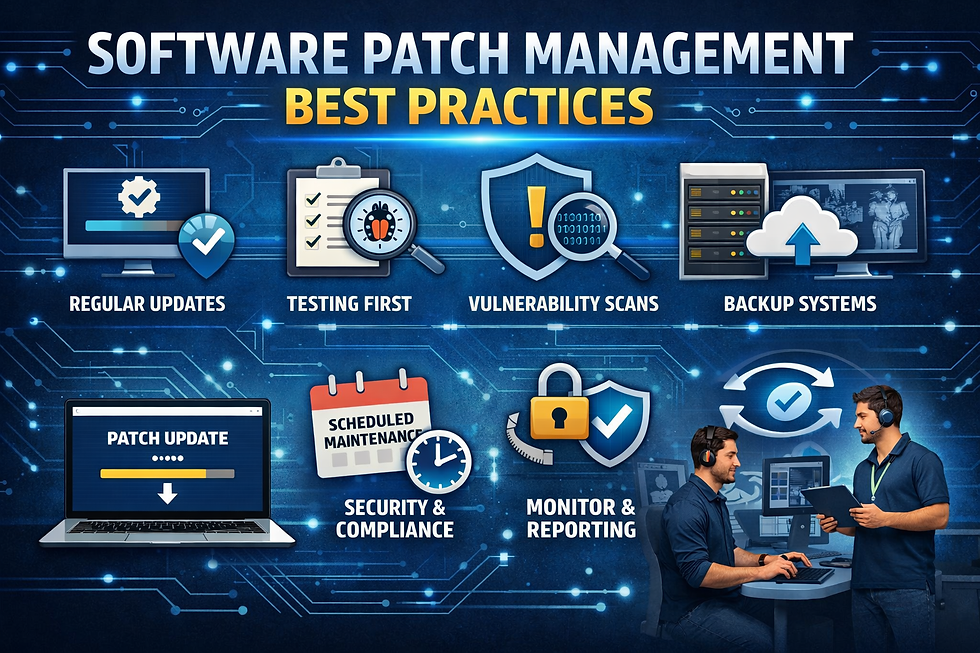
In the fast-paced environment of a Dallas dental office, software is the backbone of daily operations. From scheduling cleanings to capturing high-resolution digital X-rays, your practice relies on a complex web of operating systems, practice management software, and imaging tools. However, this same software can become a significant liability if it is not regularly maintained. Software patch management—the process of identifying, testing, and installing "patches" or updates to code—is one of the most critical yet frequently overlooked aspects of dental IT support in the DFW metroplex.
For many North Texas dental practice owners, the notification to "Update and Restart" often feels like an inconvenience that interrupts patient care. It is tempting to click "Remind me later" indefinitely, but every day a patch is delayed is a day your practice remains vulnerable to cyber threats. Modern cybercriminals specifically target known vulnerabilities in common software, knowing that smaller healthcare providers often lag behind in their update cycles. In a region as economically vibrant as Dallas–Fort Worth, local clinics are attractive targets for ransomware and data breaches due to the high value of Protected Health Information (PHI).
Effective patch management is not just a technical chore; it is a foundational component of patient safety and regulatory compliance. Whether you are managing a single chair in Fort Worth or a multi-location group across North Texas, understanding the "why" and "how" of patching is essential. This guide outlines the best practices for implementing a robust patch management strategy that protects your data, ensures system stability, and keeps your practice compliant with both federal and state regulations.
Understanding the Patching Landscape for DFW Dental Offices
What Is a Software Patch?
A software patch is a piece of code designed to update a computer program or its supporting data to fix or improve it. This includes fixing security vulnerabilities and other bugs, with such patches usually being called bugfixes or software updates. Think of a patch as a surgical repair for a flaw that was discovered after the software was released to the public.
Patches vs. Feature Updates
It is important to distinguish between security patches and feature updates. Feature updates add new functionality—such as a new interface for your scheduling module. Security patches, however, are designed to close "holes" that hackers could use to gain unauthorized access to your system. While feature updates can often be planned around your convenience, security patches usually require immediate attention to mitigate risk.
The Urgency of Security Patches
When a software developer like Microsoft or Dentrix releases a security patch, they are essentially announcing to the world that a vulnerability exists. Cybercriminals pay close attention to these announcements and begin developing "exploits" to target systems that haven't been patched yet. In the DFW area, where many dental offices share similar IT infrastructures, a single unpatched vulnerability can lead to a widespread regional "outbreak" of system compromises.
Why Consistent Patching Is Essential for Patient Data Security
Closing Vulnerabilities Before They Are Exploited
The primary goal of patching is to eliminate the window of opportunity for attackers. Many of the most famous data breaches in history occurred because a company failed to install a patch that had been available for months. For a Fort Worth dental clinic, a single unpatched server could allow an intruder to bypass your firewall and encrypt your entire patient database.
Protecting Against Ransomware in North Texas
Ransomware has become a significant threat to healthcare providers across North Texas. These attacks often gain a foothold through unpatched software in web browsers or operating systems. Once inside, the ransomware spreads throughout the network. Regular patching is one of the most effective ways to lower the "surface area" available for a ransomware attack to take hold.
Maintaining System Stability and Performance
Beyond security, patches often resolve stability issues. If your practice management software frequently crashes or your digital sensors are not communicating correctly with your workstations, it may be due to a known bug that a recent patch was designed to fix. Keeping your systems updated ensures that your technology works as intended, reducing frustration for your staff and improving the patient experience.
Navigating Regulatory Requirements in Dallas–Fort Worth
HIPAA Security Rule Requirements
The HIPAA Security Rule requires covered entities to implement a security management process to identify and analyze risks to ePHI. While the word "patching" may not appear explicitly in the original text, the requirement to protect against "reasonably anticipated threats" effectively mandates a patch management program. Many dental IT support professionals in Dallas emphasize that failing to patch known vulnerabilities is frequently cited as a "lack of due diligence" during HHS Office for Civil Rights (OCR) investigations.
Texas HB 300 and Heightened Privacy Standards
Dental practices in North Texas must also adhere to Texas HB 300, which is in some ways more stringent than federal HIPAA regulations. HB 300 expands the definition of a "covered entity" and requires shorter notification timeframes in the event of a breach. A robust patching protocol helps ensure that you never have to trigger these stressful and expensive notification requirements.
Documentation for Compliance Audits
In the event of an audit or a security incident, "if it wasn't documented, it didn't happen." DFW dental offices should maintain logs showing when patches were applied and to which systems. This documentation serves as evidence that your practice is taking proactive steps to protect patient data, which can be vital if the OCR evaluates your compliance posture.
Identifying What Needs Patching in Your Dallas Dental Office
Operating Systems (Windows and macOS)
Most dental offices in the Dallas–Fort Worth area run on Windows, which is the most frequent target for exploits. Both the server OS and individual workstation OS must be patched. This includes not just the major updates, but the smaller "cumulative updates" that Microsoft releases frequently.
Practice Management Software (PMS)
Your PMS is the heart of your practice. Whether you use cloud-based or on-premise solutions, these programs require regular updates. On-premise systems often require manual intervention to update the database engine and the client workstations simultaneously to ensure data integrity.
Digital Imaging and Radiography Systems
Imaging sensors and panoramic X-ray machines rely on specialized drivers and software to translate raw data into clinical images. These systems are often overlooked in patching cycles. However, as imaging becomes more integrated with your network, ensuring these "connected devices" are patched is essential for preventing them from becoming entry points for intruders.
Third-Party Applications (Browsers, PDF Readers)
Applications like Google Chrome, Adobe Acrobat, and Java are common in dental offices and are notorious for having security vulnerabilities. Because these programs interact with the internet, they are high-risk. North Texas practices should ensure these "third-party" apps are included in their regular patching schedule.
Network Hardware (Routers and Firewalls)
Patching is not just for computers. Your firewall, switches, and Wi-Fi access points have "firmware"—internal software that also requires updates. A vulnerability in your router could allow someone sitting in your parking lot in Dallas to intercept your office's internet traffic.
Establishing a Dental IT Support Patch Management Workflow
Inventorying Your Dental IT Assets
You cannot patch what you do not know exists. The first step for any Fort Worth clinic is to create a comprehensive list of all hardware and software in use. This includes workstations, laptops used for charting, servers, and even the tablet in the waiting room used for patient check-in.
Prioritizing Critical Security Updates
Not all patches are created equal. Updates that fix "Remote Code Execution" (RCE) vulnerabilities should be prioritized above all else, as these allow attackers to take control of your system from afar. A structured approach involves categorizing patches as "Critical," "Important," or "Optional" based on the risk they address.
The Importance of Testing Patches First
One common fear among North Texas office managers is that an update will "break" their software. This is a valid concern. Before rolling out a patch to every computer in the office, it is a best practice to test it on a single, non-critical machine. This "pilot" phase allows you to ensure the update doesn't conflict with your specific configuration or imaging drivers.
Scheduling Deployment to Minimize Downtime
To avoid interrupting patient care, patching should be scheduled during off-hours—such as late evenings or weekends. Many DFW dental practices coordinate with their IT providers to automate these updates so that the systems are patched, rebooted, and ready for the first patient on Monday morning.
Overcoming Common Patching Hurdles in Fort Worth Clinics
Legacy Hardware and Compatibility Issues
Many dental offices in Dallas still utilize older hardware to run specific pieces of equipment, such as an older intraoral camera. If the hardware is too old, it may not be compatible with the latest, most secure versions of Windows. This creates a "security gap." In these cases, it is often necessary to isolate that machine from the internet or upgrade the hardware entirely.
The "Wait and See" Approach Risks
Some practitioners prefer to wait several weeks before installing a patch to see if other users report problems. While this might avoid a minor bug, it leaves the door wide open for cybercriminals. In the current threat landscape, a "wait and see" approach is increasingly dangerous for North Texas healthcare providers.
Managing Multiple Locations in DFW
For dental groups with offices in both Dallas and Fort Worth, maintaining consistency across locations is a challenge. Centralized management tools are essential here, allowing a single view of the patch status for every machine in the entire organization, regardless of physical location.
Automation vs. Manual Patching
The Pitfalls of Relying on Manual Updates
Relying on a staff member to manually check for updates on 15 different computers is a recipe for failure. It is time-consuming, prone to human error, and almost always gets pushed to the bottom of the priority list when the office gets busy. Manual patching often leads to "patch drift," where some machines are updated while others remain vulnerable.
Benefits of Automated Patch Management Tools
Modern dental IT support often utilizes Remote Monitoring and Management (RMM) tools. These systems automatically scan your network for missing patches and deploy them according to a predefined schedule. This ensures 100% coverage and provides the detailed reporting needed for HIPAA compliance.
Why Professional Oversight Still Matters
Even with automation, things can go wrong. A patch might fail to install, or a reboot might hang. Having a professional IT partner monitoring the results of the automated process means that any failures are caught and remediated quickly, rather than being discovered when you try to open the office the next morning.
Addressing End-of-Life (EOL) Software Risks
When Manufacturers Stop Releasing Patches
Eventually, software reaches "End-of-Life," meaning the developer will no longer provide any updates, including security patches. Running EOL software is one of the highest risks a North Texas dental practice can take. Once a program is EOL, any new vulnerabilities discovered will never be fixed, making those systems "permanently" vulnerable.
The Danger of Running Windows 7 or Older
While many Dallas dental offices have upgraded, some still linger on Windows 7 or even Windows XP due to old equipment requirements. These systems are prime targets for hackers. If you are still running these operating systems, you are likely out of compliance with HIPAA and Texas state law because the systems cannot be secured.
Strategies for Migrating Away from Unsupported Tools
If a critical piece of dental equipment requires an EOL operating system, the best practice is to "air-gap" that machine—physically disconnecting it from the internet and the rest of your office network. However, the long-term solution for any DFW clinic is to budget for hardware upgrades that support modern, patchable operating systems.
Verification and Reporting Post-Patching
Confirming Successful Installation
Just because a system says it started an update doesn't mean it finished successfully. Verification is a key step. This involves checking the system logs to ensure the patch is active. For North Texas practices, this verification should be part of a monthly "Health Check" performed on the IT infrastructure.
Managing Failed Patches and Rollbacks
Sometimes a patch truly does cause a problem. A professional patch management strategy includes a "rollback" plan—the ability to quickly uninstall a problematic update and return the system to its previous state. This minimizes downtime and ensures the office can continue to see patients while the IT issue is investigated.
Generating Reports for the HIPAA Officer
Your designated HIPAA Security Officer (which is often the office manager or owner in a small DFW practice) should receive regular reports on patching status. These reports should show that all systems are up to date and identify any outliers that require manual attention. This creates a clear "paper trail" of security diligence.
Integrating Patching into Your Overall Cybersecurity Strategy
Multi-Layered Defense in North Texas Clinics
Patching is a critical layer, but it is not a silver bullet. It should be part of a multi-layered defense that includes enterprise-grade antivirus, a managed firewall, secure backups, and encryption. In the Dallas–Fort Worth area, where cyber threats are evolving, a holistic approach is the only way to truly protect your practice.
Employee Training and Awareness
Software isn't the only thing that needs "updates." Your staff needs regular training on how to recognize phishing attempts, which often try to trick users into downloading malicious files that exploit unpatched vulnerabilities. Combining technical controls like patching with human-centric controls like training creates a much stronger defense.
The Role of Incident Response Planning
Even with perfect patching, a breach is still possible through other means. Every North Texas dental clinic should have an incident response plan that dictates what to do if a system is compromised. Knowing who to call and what steps to take can significantly reduce the impact of a security event.
Key Takeaways
Patching is non-negotiable: It is a fundamental requirement for HIPAA and Texas HB 300 compliance and the most effective way to prevent ransomware.
Inventory your assets: You must know every device and software application in your DFW office to protect them effectively.
Prioritize security: Focus on critical security patches that close known "holes" exploited by cybercriminals.
Automate where possible: Manual patching is inconsistent and risky; use professional tools to ensure total coverage.
Test before you deploy: Avoid office-wide downtime by testing updates on a single machine first.
Don't forget third-party apps: Browsers and PDF readers are frequent entry points for attackers and must be patched.
Address EOL software immediately: Running unsupported systems like Windows 7 is a major liability for any North Texas practice.
Document everything: Maintain logs of your patching activities to demonstrate "due diligence" during an audit.
Managing a comprehensive patch cycle can be a daunting task for a busy dental professional. Many practices find that partnering with a specialist in dental IT support allows them to focus on patient care while knowing their systems are being monitored, tested, and updated by experts. By making patch management a priority, your DFW dental practices can enjoy the benefits of modern technology without the constant fear of a security breach. Consistent, proactive maintenance is the hallmark of a resilient dental practice in North Texas.


Comments